What is the difference between the standard Digi-Key and the "Digi-Reel only" configuration?
The standard Digi-Key configuration will pull prices for all standard packaging types (such as Tape and Reel, Tray, Tube, etc...)
If you would like to be able to also pull the customized Digi-Reel package type, please set up a second Digi-key supplier entry to be specific for Digi-Reel quotes. When you setup up a 'Digi-Reel only' Supplier Connect entry, it will only pull the customized Digi-Reel package type quotes and prices. Since Digi-Reel package types incur a $7 fee, each price found will have that amount applied in an amortized fashion.
For example; if a Digi-Reel is being quoted at $0.500 per unit for 1,000 units, then you would see a price presented as $0.507 (because the $7 fee is being spread across 1,000 units).
Supplyframe recommends starting with the standard Digi-Key Supplier Connect setup and then adding Digi-Reel only support as needed.
Step 1 - Create Supplier connection in QuoteWin Admin Portal
- Login to QuoteWin
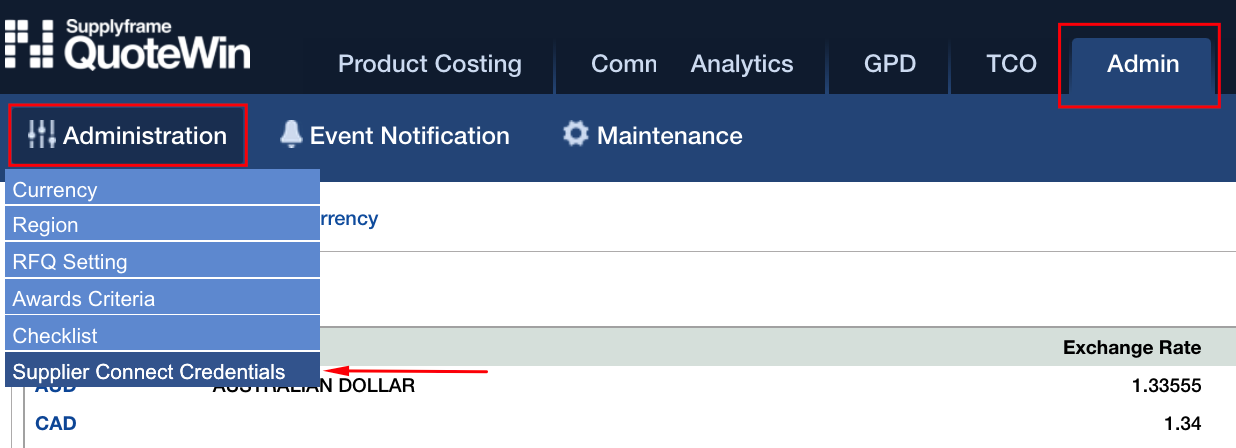
- Click Admin -> Administration -> Supplier Connect Credentials
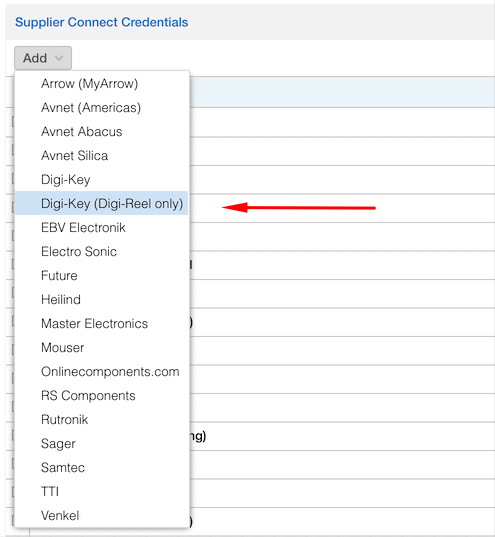
- Click “Add” Button
- Select DigiKey or Digi-Key (Digi-Reel Only) from dropdown list

- Fill in Site, Language,Currency, Ship to Country, and Customer Id fields
Important - Setting the Rate Limit Tier:
If you haven't previously negotiated a Rate Limit directly with your Digi-Key representative, please set the Rate Limit Tier to the "Product Information" setting.
If you have a specific rate limit that has been negotiated with Digi-Key, select the appropriate setting instead using the drop down:
Choose the option "Product Information" if you do not know which option is assigned to you by Digi-Key.
- Click the key icon

- When Key icon is clicked, QuoteWin will check if Digi-Key has approved the API Connection

- If not, wait and click Key Icon again later

-
If yes, proceed with your DigiKey login/authorization
- Input your Digi-Key account credentials (in pop-up window)

- If credentials are entered correctly you will see the following (Close the pop-up window after that)

- You'll see this message in QuoteWin . You are all set!

--------------------------------------------------------------------------------------------
This supplier may use rate limits/quotas to control the number of MPNs that are requested through the supplier's API endpoint. Please discuss with your supplier contact and determine if your company's rate limits/quotas are sufficient enough to manage your demand.