Step 1 - Obtain API Credentials from Future Electronics
Credentials required:
- API Key
Request third party API access credentials via a Future Electronics' sales rep or directly at: https://www.futureelectronics.com/api-solutions
- Here are the steps to obtain the credentials directly via the portal:
- Follow the link - https://www.futureelectronics.com/api-solutions
- Click “REQUEST YOUR API KEY” button

- Complete Request for Product API Form & Submit

- Instructions for filling out the request form
- Fields with a red asterisk (*) must be filled out
- Enter ‘Supplyframe QuoteWin’ for 3rd party partner
- When finished filling in the form, click ‘Submit’ button
- Once Future processes your request, an API Key will be emailed to the email address provided in the request form.
- You will need the API Key for creating the Future User in the QuoteWin Admin portal. API Key sample: YTYLF-PR2AM-LA7IQ-KRS75-MRNSR
- Once API key is received, go to the next slide
- Follow the link - https://www.futureelectronics.com/api-solutions
Step 2 - Create Supplier connection in QuoteWin Admin Portal
- Login to QuoteWin
- Go to Admin -> Administration -> Supplier Connect Credentials

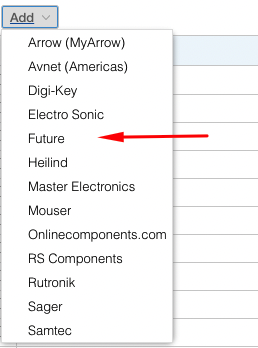
- Click “Add” Button
-
Select "Future" from the dropdown list
Fill in the required fields with the credentials received from Future Electronics

After you have completed the credential setup, you will want to then link those credentials to the supplier. See an example using the link below.
Linking Credentials to the Supplier
This supplier may use rate limits/quotas to control the number of MPNs that are requested through the supplier's API endpoint. Please discuss with your supplier contact and determine if your company's rate limits/quotas are sufficient enough to manage your demand.