The lookup function in the pricing table can be used to pull in prices (and other price attributes) into the current project. This is especially useful when you want to use any contract prices you may already have on file, or use any recent pricing that suppliers may have quoted in past projects.

I. Set Initial Lookup Criteria
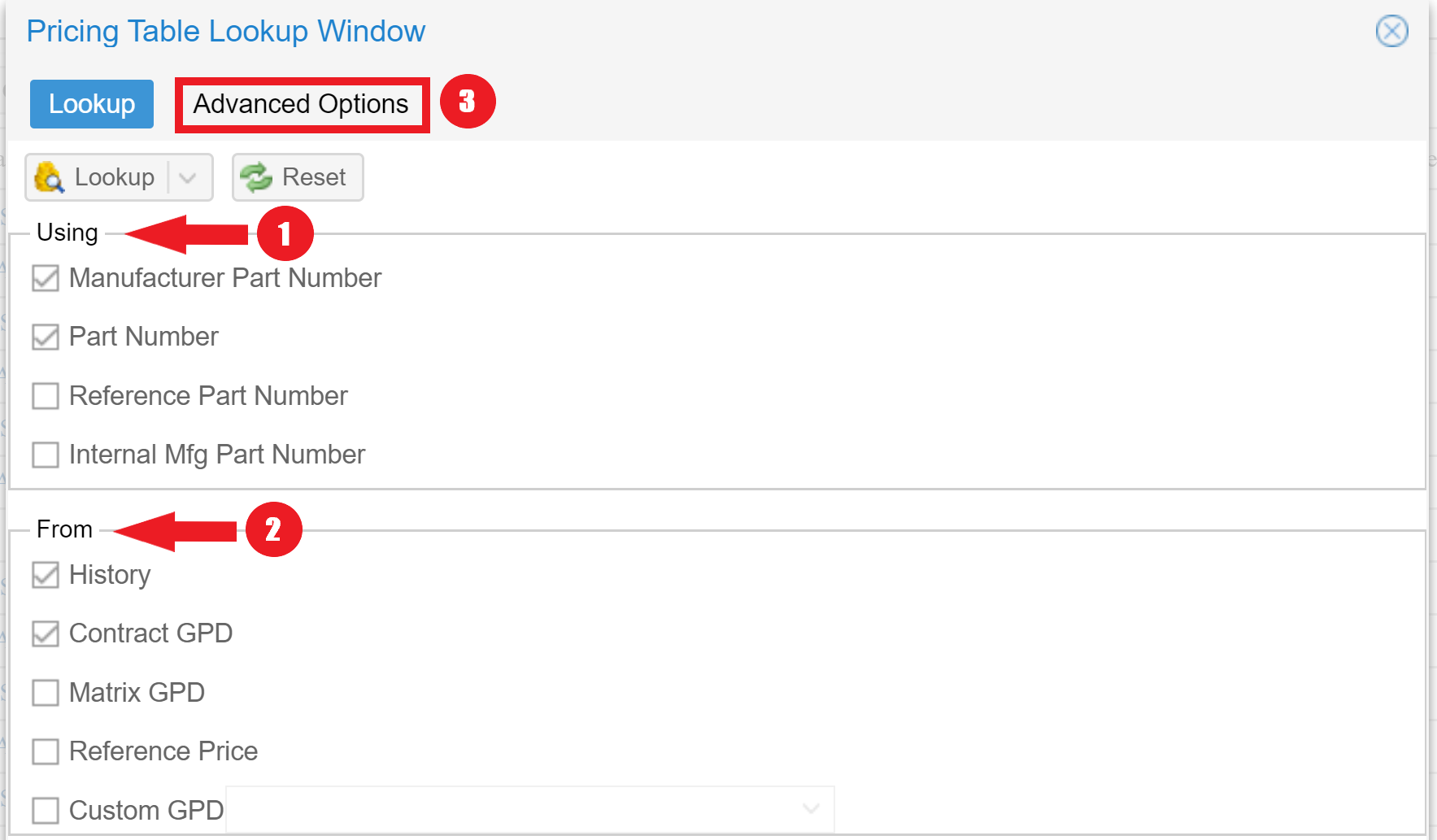
- Choose the type of part you want to use in order to find price matches (99% of the time this will be MPN only)
- In the "From" section check all options you want to try to find matches from
- History is any other project in QuoteWin
- Contract GPD is the specific contract sub-section in your Global Pricing Database
- Matrix GPD is the specific matrix sub-section in GPD (this type of lookup does not operate on PN or MPN, but rather the matrix type matching instead)
- Reference Price will search the reference prices from the BOMs of your projects instead of MPN prices
- Custom GPD is the specific sub-section (aka Price Type) in GPD. Also, choose one or more custom/price type tables in the combo selector box if using this feature
- Now go to the Advanced Options tab in order to dial in specific allowances and criteria for your lookup results.
II. Advanced Lookup Criteria
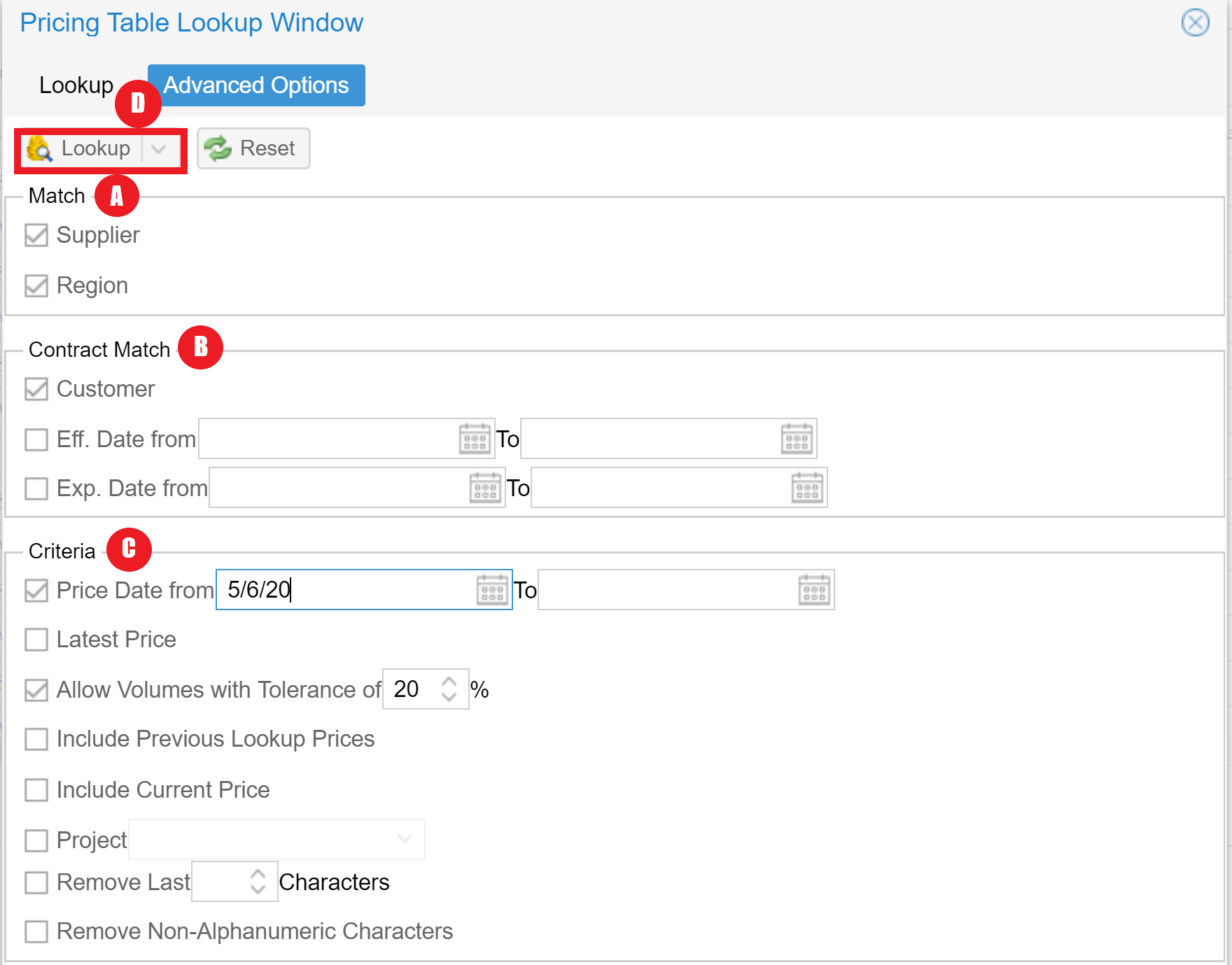
A. Match
Check both the Supplier and Region boxes in order to restrict the lookup to the current region as well as ensure supplier matches are only saved to the same supplier line. Otherwise, you can uncheck the options to allow matches outside of the region or to pull in other supplier prices. Typical settings match both supplier and region.
B. Contract Match
- These settings only apply to Contract GPD sources
- Check the Customer box to ensure that only GPD entries with the same customer as the current project are used
- Uncheck the Customer box to use Contract GPD entries with a null customer instead of a matching customer
- Fill in effective and/or expiration dates and check those boxes if you wish to use date matching in your lookup. Leave unchecked to ignore dates altogether.
- Note that you do not need to use both a start and end date. Only one is required when using the option. For example - fill in an ending expiration date only if you only want to check that the item is not expired yet. This will ignore your starting dates
C. Criteria
- Price Date allows you to limit your lookup from historical pricing to only be within a certain date range. Use this feature to set a specific range or an open starting date from when you want the query to begin running. This will prevent very old prices from being used.
- Latest Price allows you to override the standard "lowest" login and use the more recent match instead of the lowest match. Otherwise, if multiple results are found - the lowest will be used instead of the most recent.
- Volume Tolerances should be used to lock in an exact match based on matching the quoted volume in addition to the part (check and set to 0%). If you want to allow some tolerance in the volume, but not leave it completely open, increase the percentage of the tolerance. For example - set to 20% to allow a price for volumes from 800 - 1200 to be used for a volume of 1000. Unchecking this field will ignore volumes altogether, but may result in unlikely pricing based on widely disbursed pricing based on large quantity differences.
- Include Previous Lookup Prices can be used to include looked-up prices from a project instead of original project prices. Note this may unknowingly increase your date restrictions, pulling in an outdated price because it is a lookup in a more recent project.
- Include Current Price can be used to factor the current price into the decision-making criteria. If this is unchecked - any lookup match will overwrite the price you currently have saved. If you want to only pull in better pricing from the lookup this should be checked.
- The single project selector can be used to lock in the lookup to a particular project only. Note only projects of the same type can be used in this selector
- Remove last x characters can ignore characters off the end of matching results - allowing you to account for insignificant differences at the ends of MPNsa
- Remove non-alphanumeric characters can be used to ignore dots, dashes, and slashes from matching parts